The Meta-Experience: Using AI to Build AI Tools
In the world of software development, we often talk about eating our own dog food. But what about using AI to build AI-powered tools? That’s exactly what I set out to explore in my latest project – an Architecture Enablement Platform that uses AI to help teams understand and interact with complex banking architectures.
This project was driven by two main motivations:
- Exploring the practical implementation of AI agentic workflows – how to build intelligent agents that can understand context, maintain state, and guide users through complex tasks
- Making the Banking Industry Architecture Network (BIAN) more accessible – creating a tool that helps teams understand and navigate the complex world of banking architecture
⚠️ Work in Progress: This project is currently under active development. Features, documentation, and functionality may change frequently. Feedback is welcome!
Live Demo: https://satjinder.github.io/aae/
Source Code: https://github.com/satjinder/aae
The Problem Space
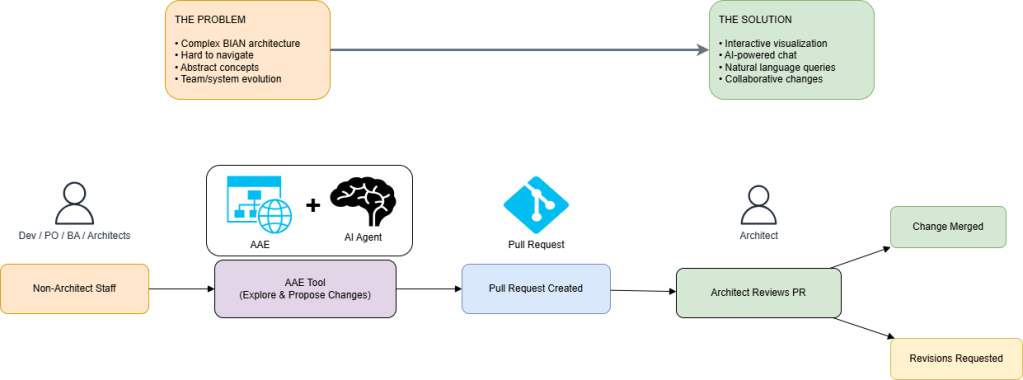
Enterprise architecture, especially in banking, has always been a complex beast. The Banking Industry Architecture Network (BIAN) provides a comprehensive framework, but understanding how these abstract concepts map to real systems and teams is challenging. Add to this the natural evolution of systems and teams (Conway’s Law in action), and you have a perfect storm of complexity.
The Solution: Architecture as Enablement
Instead of treating architecture as a rigid set of rules, I wanted to explore it as an enabler. The idea was simple:
- Let architects define the constructs
- Enable teams to understand and interact with these constructs
- Allow anyone to propose changes
- Facilitate review and validation
But how do you make this practical?
The Technical Journey
1. The Visualization Layer
Staying close to my comfort zone, I picked up React and Material UI for the UI layer. The foundation is a React-based visualization using ReactFlow and ELK.js. This provides the canvas for mapping:
- BIAN service domains
- Actual systems
- Team structures
- Their relationships
2. The AI Layer
Here’s where it gets interesting. I used LangChain and OpenAI to create an AI agent that:
- Understands natural language queries about architecture
- Can identify relevant components and relationships
- Helps users explore the architecture through conversation
3. The BYOK Architecture
Privacy and security were key concerns. The solution? A Bring Your Own Key (BYOK) architecture:
- Everything runs client-side
- API keys stay in the browser’s local storage
- No server-side processing of sensitive data
How the Tool Works
The BIAN Visualization Tool provides an interactive way to explore complex banking architectures. It empowers users to:
- Search and filter BIAN service domains, systems, and teams using keywords
- Visualize relationships between service domains, real-world systems, and organizational teams
- Dynamically bring relevant items onto the board for detailed analysis
- Use an AI-powered agent to answer natural language queries about the architecture, such as finding specific nodes, understanding relationships, identifying team responsibilities, or performing gap analysis (e.g., checking for missing features like crypto currency support)
The tool operates entirely client-side, with optional AI features enabled by providing your own OpenAI API key (BYOK mode). All AI operations are performed in the browser, ensuring privacy and security.
The Board
The main interactive visualization board showing BIAN domains and relationships.

AI Agent: Search by Name and Type
The AI agent helps users find nodes by name or type using natural language
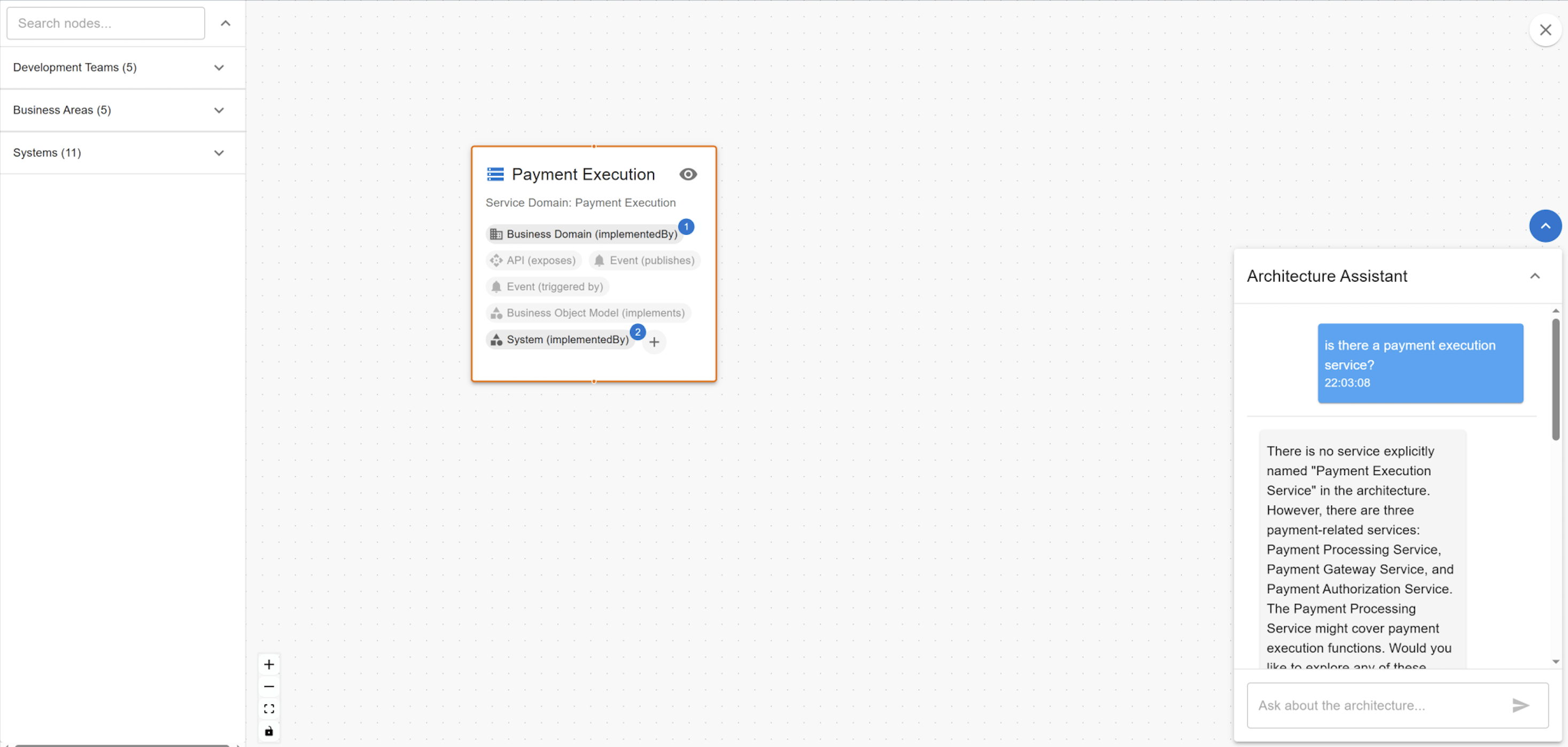
AI Agent: Reveal Team-Service Relationships
The agent uncovers which teams are responsible for specific service domains, even if not directly visible.

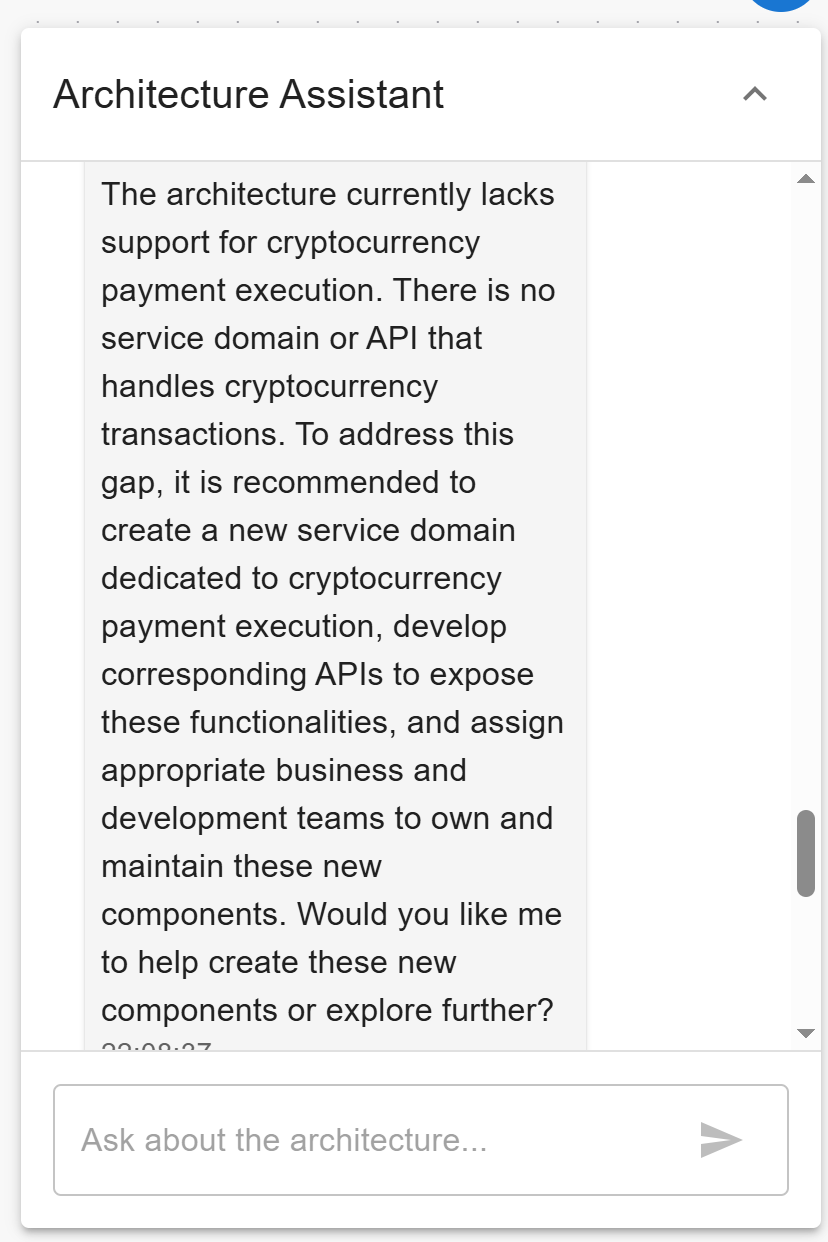
AI Agent: Gap Analysis for Crypto Currency Support
LLM response to a query about crypto currency support in the Payment Execution service domain, highlighting architectural gaps.
Tool’s Architecture: Data, Visualization, and AI Tools

Data as JSON
All architecture data (systems, service domains, teams, relationships, etc.) is stored as JSON files. This makes the data easy to update, version, and extend. The application loads these files at runtime to build the architecture graph.
Visualization with React Flow
The interactive architecture diagram is rendered using React Flow, as implemented in ArchitectureViewer.tsx. Nodes and edges are dynamically created based on the loaded JSON data, and users can interact with the graph to explore relationships, add nodes, or view details.
Local Service Tools for LLM Context
- architectureService.ts: Provides all core logic for querying, searching, and relating architecture nodes and edges. It exposes methods for gap analysis, path finding, and node/edge management, which are used both by the UI and the AI agent.
- diagramService.ts: Manages the current state of the diagram (which nodes/edges are visible, expanded, etc.), enabling the UI and agent to update the visualization in response to user queries or actions.
These services are used to provide context and actions for the LLM, so the agent can answer questions about the architecture and manipulate the diagram.
AI Agent and LangChain Integration
- /agents: Contains the definition of the AI agent, tools, and chains. The agent uses LangChain to interpret user queries, invoke the right tools (such as searching nodes, analyzing gaps, or updating the diagram), and return results.
- ArchitectureChat.tsx: Implements the chat UI, connecting user input to the agent. When a user asks a question, the message is sent to the agent, which uses LangChain to reason over the architecture data and tools, then returns a response and (optionally) updates the diagram.
This architecture allows the LLM to iterate over the data, use local tools for precise answers, and provide a seamless, interactive experience for exploring complex banking architectures.
Lessons Learned
- Context is King: The AI agent’s effectiveness heavily depends on the context it’s given. This mirrors real-world architecture, where context is crucial for understanding.
- The Power of Visualization: Complex relationships become clear when visualized. The combination of graph visualization and AI-powered exploration creates a powerful tool for understanding architecture.
- Architecture as a Living Thing: By enabling teams to propose changes, the architecture becomes a living, evolving entity rather than a static document.
- The Importance of Privacy: The BYOK approach shows how we can leverage AI while maintaining privacy and security.
- Metadata as a Bridge: Rich metadata serves as a crucial bridge between human and machine understanding. By enriching your models and interfaces with meaningful metadata, you not only make them more discoverable but also more understandable. This is particularly relevant in the age of LLMs, where machines can understand natural language – your metadata can be human-readable descriptions that serve both as documentation and as context for AI systems. Clear, structured metadata also helps control LLM behavior, reducing hallucinations by providing well-defined boundaries and context for the model to work within.
- The Limits of Vibe Coding: Pure vibe coding only takes you so far. It starts with an exciting “aha moment” where natural language generates working code, but as you need to alter and evolve the system, friction emerges in getting deterministic outcomes. English acts as a sort of programming language here, but it’s imprecise – the same request can yield different results across iterations. When AI gets stuck in a corner, you need to roll up your sleeves and take the driver’s seat. This is like when your self driving car lands in thick wet mud where only experienced drivers can navigate out. The key is ensuring the generated code remains maintainable and human-readable for these moments – I had to jump in multiple times during this project to debug integration issues and refactor components that the AI couldn’t handle. We’ve seen this pattern before with tools that tried to hide code complexity through drag-and-drop UIs – they work wonderfully until you hit the boundaries of what they can abstract away, then you need direct access to the underlying system.
The Future
This project opens up interesting possibilities:
- Could we use similar approaches for other complex domains?
- How can we improve the AI’s understanding of architectural patterns?
- What other ways can we make architecture more accessible to teams?
Conclusion
Building an AI-powered architecture tool using AI itself has been a fascinating journey. It’s shown how we can use technology to make complex concepts more accessible while maintaining the rigor needed in enterprise architecture. The key insight? Architecture shouldn’t be a barrier – it should be an enabler.
As with any tool, the real value comes from how it’s used. This platform isn’t just about visualizing architecture – it’s about enabling better architectural decisions through collaboration and understanding.
Note: This project is available at [https://satjinder.github.io/aae/](https://satjinder.github.io/aae/). The source code can be found at [https://github.com/satjinder/aae](https://github.com/satjinder/aae). Feel free to explore and provide feedback.*

 code simple { }
Leave a comment